How it works
Direct where the network allows. Sealed between the two PCs.
A session tries the local network and a relay at the same time and keeps whichever answers first. The two PCs agree their keys with each other; a relay carries sealed bytes it holds no key for.
Said plainlyA session let in with Allow and no password typed is encrypted but not proof against an active attacker in the relay path. The limits, in full.
A session, step by step
The number
Every PC running Nelkira shows a nine-digit number and a password. The person there reads them to you.
A yes, or the password
Leave the password blank and the person at the PC is asked to allow you; with no answer in 60 seconds, the connection is turned away. Type the password and you go straight in. Tick Remember and your device can come back without it.
Their screen, in your window
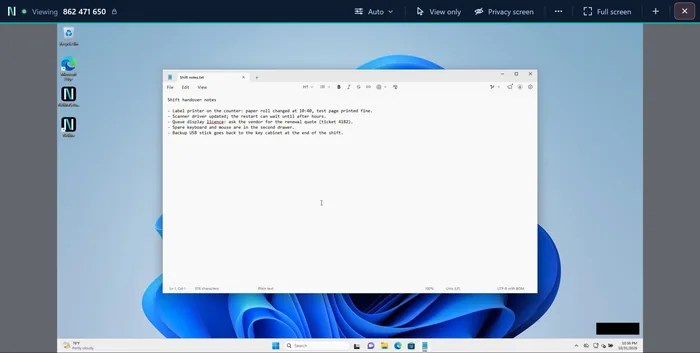
Their desktop fills a window on your PC, with the session bar above it. An amber ‘Screen shared’ sign sits at the bottom right of their screen while someone is connected, except on Windows’ lock, sign-in, Ctrl+Alt+Del and administrator-prompt screens.
The record
Who connected, how they got in, when it ended, which files moved and their names, kept on the PC that was reached. Never the content.
What you can do in a session
View only
Look without touching their mouse or keyboard.
Privacy screen
Blank their monitor from people walking past.
Said plainly: it blocks their keyboard and mouse only with administrator rights, or on a PC set up for access when nobody is there.
Several screens
Switch between that PC’s monitors.
Copy and paste text and files (Windows)
In both directions. The record keeps names and sizes, never contents.
Ctrl+Alt+Del
On PCs set up for access when nobody is there.
Picture quality: Auto, or choose
Auto fits the line, or choose Smooth, Balanced or Sharp.
Said plainly: Auto runs on the PC you reach, so it needs an up-to-date Nelkira there.
Several PCs in tabs
Each PC you reach gets its own tab.
Reach a PC from your phone
Nelkira Go runs in the phone’s browser; nothing to install.
Not yet: chat, a file window.
A picture that adjusts to the line
From release 0.6.0, Nelkira adjusts picture quality to the connection by default (Auto). You can choose Smooth, Balanced or Sharp instead. Auto never uses more data than Balanced unless you choose Sharp. Auto runs on the PC you reach, so that PC needs Nelkira 0.6.0 or later. In Nelkira Go and in viewers from before 0.6.0, which have no Auto item, choosing Balanced keeps Auto. The Nelkira 0.6.0 app for Windows and Linux remembers the setting you choose for each PC you reach by its number. What each setting needs from a line is on the connection test page.
Where your session goes
Two PCs on the same network normally talk straight to each other where Windows Firewall allows it; the relay still hears about the call while it is set up. Where a firewall refuses a direct path, the session goes through a relay on port 443, the port web browsing uses, so neither PC needs a public address or a forwarded port.
Said plainlyYou can run your own Nelkira relay. Sign-up, downloads and updates still come from nelkira.com. The self-hosting guide says how.
Encrypted end to end, including against us
The two PCs agree a fresh key with each other for every session, and everything after that is sealed: screen, keystrokes, clipboard, files. A relay, ours included, holds no key that would let it read it.
Said plainlyTwo limits: a session let in with Allow and no password typed, and a password sign-in from an older viewer. Both are set out, with the ciphers and the dates, on the security page.
The record stays on the PC that was reached
When a session started, how it was authorised, when it ended, files moved and their names, clipboard transfers by size, screen switches. It never contains the content itself: no clipboard text, no file contents, no keystrokes, no screenshots. Evidence of what was done to a computer belongs to whoever owns it.
Said plainlyIt is a plain file today, not yet tamper-evident, and anyone with a Windows account on the PC can alter or delete it (from release 0.5.0, on a PC set up for access when nobody is there, only administrators can).